Frequently Asked Questions
1. Why should I change my Garmin watch bands?
2. What types of Garmin watch bands are available?
3. What tools do I need to change my Garmin watch band?
4. What is the step-by-step process for changing Garmin watch bands?
5. Where can I buy quality Garmin bands and straps?
The Garmin watch is an incredible piece of technology that not only tracks your fitness goals but also showcases your style. As styles change and you experience various activities, the need to switch out your watch band arises. Here, we present a step-by-step guide on how to change Garmin watch bands, ensuring your watch stays stylish and comfortable. By following this guide, you can seamlessly switch between different Garmin bands and straps, emphasizing comfort and versatility.
Why Change Your Garmin Watch Bands?
Switching out your Garmin watch bands offers several benefits that go beyond aesthetics:
- Comfort: Different activities require different levels of comfort. Choosing comfortable Garmin watch bands can make a significant difference during workouts or daily wear.
- Style: Because your watch is often a focal point, having a variety of bands allows you to express your personal style.
- Functionality: Certain bands enhance specific features of your Garmin watch, like water resistance or sturdiness for high-impact activities.
- Durability: Changing bands helps maintain the integrity and longevity of your watch, especially if you use it in harsh conditions.
Types of Garmin Watch Bands
Before diving into the steps of changing your Garmin watch bands, it's essential to understand the different types available:
- Silicone Bands: Ideal for workouts due to their sweat-resistance and lightweight nature.
- Leather Bands: A versatile option suitable for both casual outings and formal events.
- Metal Bands: Offers a more sophisticated look and can be adjusted for various wrist sizes.
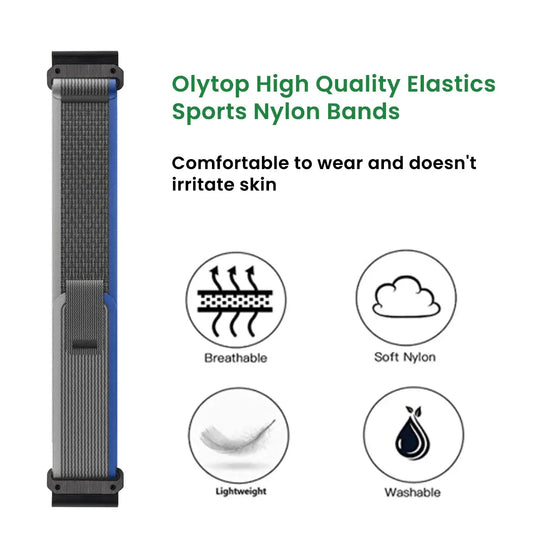
- Nylon Bands: Breathable and comfortable, perfect for outdoor activities.
Tools You’ll Need
Changing out Garmin bands and straps is relatively simple, but having the right tools will make the process smoother:
- A watchband removal tool or a small pin
- A soft cloth to clean your watch
- Your new Garmin watch band of choice
Step-by-Step Guide to Change Your Garmin Watch Bands
Step 1: Prepare Your Workspace
Start by choosing a clean, well-lit area to work in. Lay down a soft cloth to ensure your watch doesn’t get scratched during the process.
Step 2: Remove the Existing Band
Locate the band release mechanism on the back of the watch. Most Garmin watches come with a quick-release function that allows for easy band removal. Here’s how to do it:
- Press the band release lever while gently pulling the band away from the watch body;
- If your Garmin does not have a quick-release lever, use your watchband removal tool to push the spring bar inwards and release the band;
- Take care not to apply too much force, as damaging the spring bar may affect how well the new band fits.
Step 3: Clean the Watch
Before adding a new band, use the soft cloth to wipe the back and sides of your watch. This helps remove any residue or sweat that has accumulated, promoting a better fit and comfort with your comfortable Garmin watch bands.
Step 4: Attach the New Band
Now that you’ve removed the old band, it’s time to attach your new one:
- First, align the new band with the watch lugs;
- Insert the spring bar into the band and ensure it fits into the groove on the watch;
- If you’re using the release lever, slide the band in while pressing down on the lever until you hear a click, indicating it's securely in place;
- For spring bar methods, gently press the lever downwards while sliding the band in, releasing the bar into the groove once in position.
Step 5: Check for Security
After attaching the new band, it’s essential to check that it’s securely installed:
- Gently tug on the band to ensure that it’s locked in properly;
- Rotate the watch to ensure no parts wiggle or feel loose;
- Make sure it feels comfortable when worn on the wrist.
Care Tips for Your Garmin Bands and Straps
To extend the life of your comfortable Garmin watch bands, consider the following maintenance tips:
- Clean your bands regularly to prevent dirt buildup, especially if you've been exercising or in humid conditions;
- Avoid prolonged exposure to direct sunlight or harsh chemicals that could wear down materials;
- Store your bands in a cool and dry place when not in use, ideally in a protective bag or container;
- Inspect bands for any wear or tear, swapping them out promptly to prevent breakage.
Choosing the Right Garmin Band for Your Lifestyle
Selecting the right Garmin watch band depends on your lifestyle and activities:
- If you’re an avid runner, consider breathable silicone bands that wick away moisture.
- For outdoor enthusiasts, durable nylon or metal bands could offer the functionality you need.
- If you often dress up, leather bands may provide the perfect blend of style and comfort.
- Always keep comfort in mind; the better the fit, the more enjoyable the wearing experience.
Where to Buy Quality Garmin Bands and Straps
Finding good quality bands is essential for the longevity of your Garmin watch. Look for reputable sources that specialize in Garmin accessories. Online stores, specialty shops, and verified sellers offer a variety of options that cater to different tastes and budgets. Make sure to read reviews and check ratings to ensure you are buying the best quality for your needs.
Creating Your Unique Style
Switching out your Garmin watch bands regularly allows you to keep your style fresh and aligned with different occasions. Investing in various quality bands enhances your daily experience as you can match them according to your outfit or activity. It’s not just a tech accessory; it’s a fashion statement!
Remember, making the switch to new Garmin bands and straps doesn’t have to be daunting. With the right tools and understanding the process, you can effortlessly transform your watch's appearance and maintain each band’s comfort. So go ahead, try out different look and functionality. Your Garmin watch deserves it!